How to watch TV over OFNL broadband
Streaming services, equipment and broadband speeds for a new build home
Editorial responsibility: OFNL Compare (Built By Board Ltd).
Content and sources checked . Report a correction.
Watching TV without an aerial
Many TV services work over broadband, so a home without an aerial can still have live and on-demand viewing. The channels available depend on the service, your equipment and subscriptions. Choose the channels you want first, then check device compatibility and broadband requirements.
Check the TV connections in your new home
Check the handover information for your particular property. Some OFNL developments have a communal TV system; others may need a separate aerial or a broadband TV service. Ask the developer or management company what is installed and whether external dishes or aerials need permission. Source: OFNL resident FAQs.
- Check existing equipment: a communal system or wall outlet may already provide TV reception.
- Check permissions: ask the developer, landlord or management company before installing an external aerial or dish.
- Check your viewing needs: a broadband service may not carry every channel available through an aerial or satellite.
The main ways to watch live TV over broadband
These are examples of ways to watch over broadband. Check the current channel list and supported equipment before buying a TV or subscription:
- Freely: streams live and on-demand TV on supported TVs and devices. Some extra channels may need an aerial. Check the Freely equipment requirements.
- Broadcaster apps: check the broadcaster's current live channels and the apps supported by your TV or streaming device. Availability can differ between devices.
- Subscription TV: Sky Stream works over broadband. Confirm the channels, minimum speed, equipment and contract directly with the service.
Broadband TV uses your internet connection and home network. The access line, Wi-Fi, device and streaming service can all affect picture quality or buffering.
IPTV players: bring your own playlist
Beyond the mainstream apps there’s a more flexible option: IPTV player software. An IPTV player is an app that plays live channels from a playlist you supply, usually an M3U/M3U8 file or an Xtream Codes login provided by a TV service you subscribe to. It’s the same approach specialist and international TV services use to reach viewers, and it’s handy if your channels come from a service that supplies a playlist rather than its own app, or from your own home media server.
An IPTV player does not supply a subscription or rights to TV channels. IPTV Player Zero is a desktop player made by Built By Board Ltd, which also operates OFNL Compare. This is a mention of our own product, not an independent product review. Check compatibility with your TV service before choosing any player.
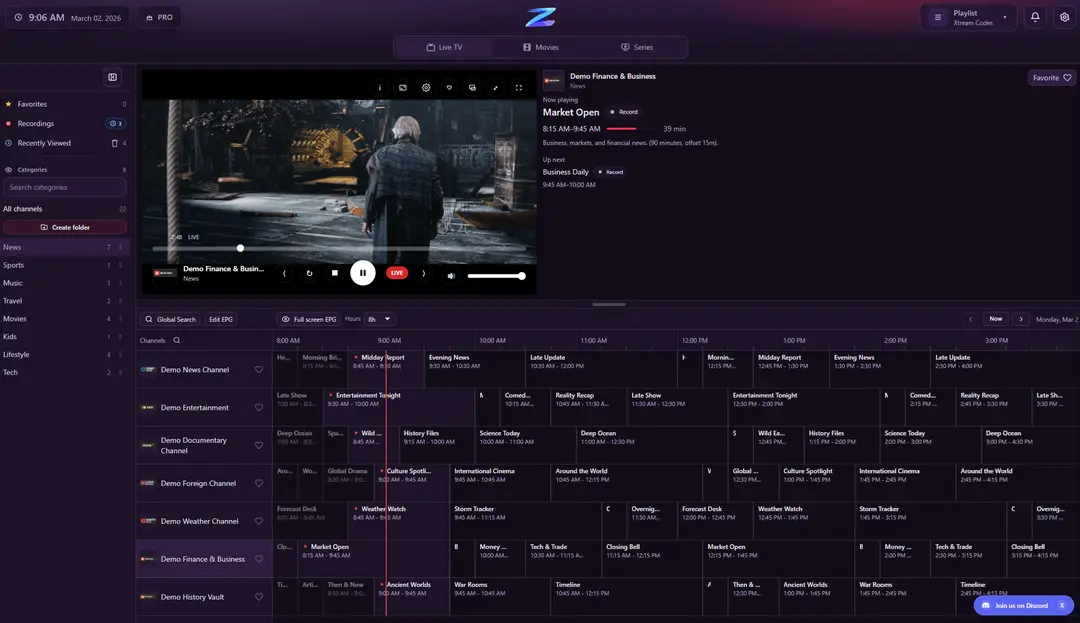
Use official services or playlists you have permission to access. A player does not establish that a channel supplier has the necessary rights. Check the supplier and terms before paying; a low price alone does not establish whether a service is authorised.
How much speed does streaming actually need?
Requirements vary by service and picture quality. These published recommendations are for the named service, not guarantees for every type of stream:
| Service / quality | Recommended connection | Official source |
|---|---|---|
| Netflix HD (720p) | 3 Mbps or higher | Netflix speed recommendations |
| Netflix Full HD (1080p) | 5 Mbps or higher | Netflix speed recommendations |
| Netflix 4K | 15 Mbps or higher | Netflix speed recommendations |
| Freely | At least 10 Mbps | Freely connection guidance |
Allow capacity for simultaneous streams and other activity. Two Netflix 4K streams need at least 30 Mbps under its recommendation, before adding headroom. An entry-level connection will not necessarily support several 4K streams at once. Full fibre can still be affected by congestion, Wi-Fi and device limits. Run a speed test on the device you use to watch.
Getting the best streaming experience
- Try Ethernet: a cable from the router to the TV or streaming box can remove a weak Wi-Fi link from the route.
- Check router placement: try an open position and test the signal where you watch. Walls, distance and interference affect Wi-Fi.
- Follow the setup guide: our ONT and router guide explains the equipment and when to ask your provider for help.
Frequently asked questions
Do I need a TV licence to stream live TV?
You need a TV Licence to watch or record live TV programmes on any channel or service, and to watch or download BBC programmes on iPlayer. On-demand viewing outside BBC iPlayer generally does not require one; check your use against the current TV Licensing guidance.
Can I watch TV without an aerial?
Yes, using a compatible broadband TV service or app. The channels and features vary. Check the Freely equipment guide or the requirements of your chosen service.
What broadband speed do I need for 4K streaming?
Netflix recommends at least 15 Mbps for one 4K stream. Other services can require more. Add capacity for simultaneous streams and other use, and check the speed reaching your TV. Source: Netflix.
How do I choose an IPTV player?
Confirm that the player works on your device and supports the format supplied by an authorised TV service. Players do not include channel rights. IPTV Player Zero is made by Built By Board Ltd, the operator of OFNL Compare, so our mention is a disclosure of our own product.
Get the right OFNL package for streaming
Compare the listed OFNL packages and choose enough download capacity for the household's simultaneous use. Confirm address availability, the router and the final contract with the provider.